Most people underestimate this until they experience the real impact.
External Storage Buying Guide: Choosing the Best SSD or Hard Drive for Your Data
In an increasingly data-rich world, having reliable external storage isn’t just a convenience; it’s a necessity. Whether you’re safeguarding precious memories, expanding your gaming library, managing professional creative projects, or simply backing up your essential documents, the right external drive is critical. However, navigating the landscape of external SSDs and traditional hard drives can be perplexing, with a myriad of specifications, interfaces, and capacities to consider. This comprehensive guide aims to demystify the choices, helping you select the ideal external storage solution for your unique needs and budget.
SSD vs. HDD: Understanding the Fundamental Differences
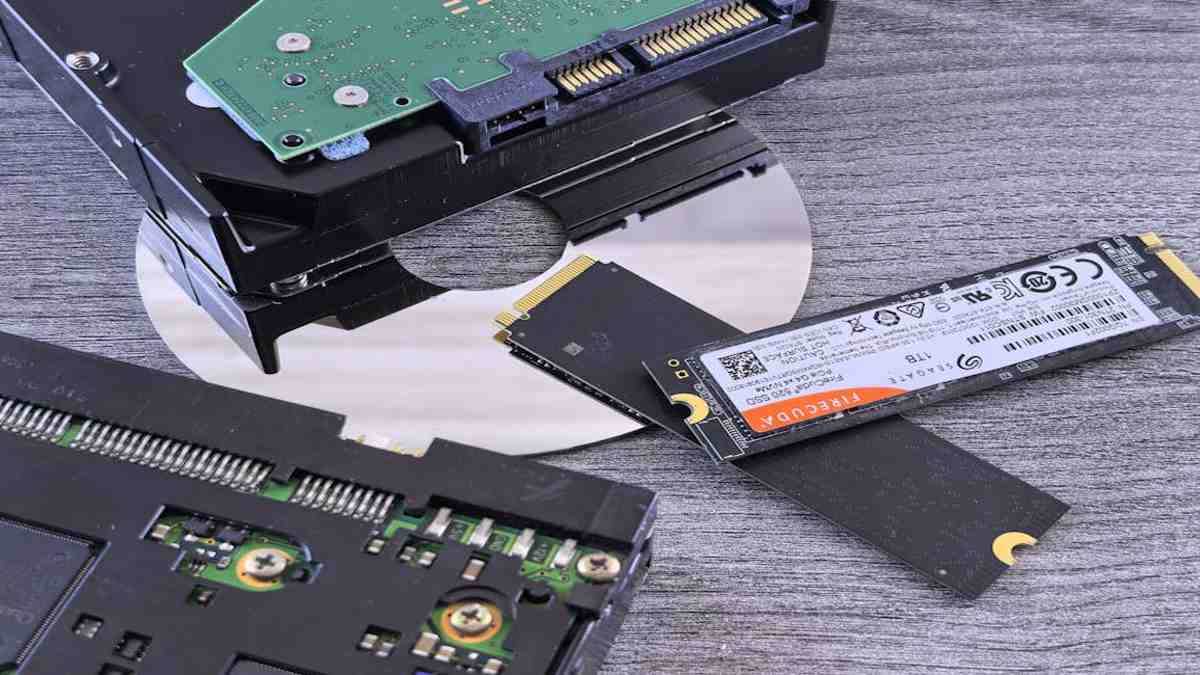
At the core of your decision lies the fundamental technology: Solid State Drives (SSDs) and Hard Disk Drives (HDDs). While both serve the purpose of storing your data, their underlying mechanisms and resulting performance characteristics are vastly different, dictating their suitability for various applications.
Performance: Speed and Throughput
When it comes to speed, SSDs are the undisputed champions. Lacking any moving parts, an SSD uses flash memory to store data, allowing for incredibly fast read and write speeds, often several times quicker than even the fastest HDDs. This translates into rapid file transfers, quicker application loading times, and a snappier overall experience, especially when dealing with large files or demanding software. HDDs, on the other hand, rely on spinning platters and read/write heads to access data. While modern HDDs have optimized their rotational speeds and cache memory, they are inherently limited by mechanical physics, making them significantly slower than SSDs, particularly for random access tasks.
Durability and Reliability: Mechanical vs. Solid State
The absence of moving parts also gives SSDs a distinct advantage in durability. They are far more resistant to drops, bumps, and vibrations, making them an excellent choice for portable storage that will be carried around frequently. An external SSD is generally more robust and less prone to mechanical failure from physical shock. HDDs, with their delicate spinning platters and read/write heads, are susceptible to damage if dropped or subjected to significant impact while operating. This makes them a more suitable option for stationary setups or less frequently moved backup solutions where physical trauma is less likely.
Capacity and Cost: Getting the Most Bang for Your Buck
Historically, and still to a significant extent, HDDs offer a much lower cost per gigabyte compared to SSDs. If your primary need is vast storage capacity for archiving large quantities of data where speed isn’t the absolute priority—think extensive media libraries, long-term backups, or large surveillance footage—then an external hard drive typically provides far more space for your money. SSD prices have steadily decreased, making higher capacities more accessible, but they still command a premium. For mainstream users, external SSDs are commonly found in capacities up to 4TB or 8TB, whereas external HDDs can easily reach 10TB, 16TB, or even more, at a fraction of the cost per terabyte.
Identifying Your Storage Needs: What Will You Be Storing?
The first step in choosing the best external drive is to clearly define its primary purpose. Your use case will heavily influence whether an SSD or HDD is more appropriate, along with the necessary capacity and connection types.
For Everyday Backups and Archiving
If your main goal is to create backups of documents, photos, and general files, or to archive older projects that you don’t access daily, a high-capacity external hard drive is often the most sensible and cost-effective choice. The slower speeds of an HDD are rarely a hindrance for these tasks, and the significant cost savings per gigabyte allow you to store vast amounts of data without breaking the bank.
For High-Performance Workloads: Video Editing, Gaming, Large Databases
Professionals working with large files, such as video editors, graphic designers, music producers, or data analysts, will find an external SSD indispensable. The rapid read/write speeds of an SSD drastically reduce rendering times, accelerate file transfers, and provide a much smoother workflow when editing directly from the drive. Gamers who want to store a large library of titles and benefit from faster load times for their favorite games will also greatly appreciate an external SSD. In these scenarios, the investment in speed pays dividends in productivity and user experience.
For Portability and On-the-Go Access
When mobility is a key factor, a portable external SSD is the clear winner. Their compact size, light weight, and superior durability against drops make them ideal for travelers, photographers in the field, or anyone who needs to frequently transport data between locations. Most portable SSDs are bus-powered, meaning they draw power directly from your computer’s USB port, eliminating the need for an external power adapter and further enhancing convenience.
For Shared Network Storage: The NAS Advantage
For homes or small offices requiring centralized storage that can be accessed by multiple devices over a network, a Network Attached Storage (NAS) solution is often the most robust choice. While technically a housing for internal drives, external NAS enclosures often utilize traditional HDDs (designed for 24/7 operation) to provide large capacities for media streaming, file sharing, and automated backups across various devices. While not a direct external drive, it’s an important consideration for collaborative or multi-device environments.
Crucial Connection Types and Interfaces
The fastest external drive in the world is only as fast as its connection to your computer. Understanding the different interfaces is crucial to maximizing performance and ensuring compatibility.
USB-C and USB-A: The Universal Connectors
The ubiquitous Universal Serial Bus (USB) remains the most common connection. Modern external drives predominantly use USB-C ports on the drive itself, offering reversibility and high speeds. You’ll encounter various USB standards:
USB 3.2 Gen 1 (formerly USB 3.0 or 3.1 Gen 1): Offers speeds up to 5Gbps, suitable for most external HDDs and basic SSDs.
USB 3.2 Gen 2 (formerly USB 3.1 Gen 2): Boosts speeds to 10Gbps, ideal for external SSDs to unlock their potential.
USB 3.2 Gen 2×2: Provides 20Gbps, offering even faster transfers but requiring compatible ports on both devices.
USB4: The newest iteration, often built upon the Thunderbolt 3/4 protocol, offering up to 40Gbps and more versatile functionality.
Always ensure your computer’s USB ports match or exceed the drive’s capabilities to avoid bottlenecks.
Thunderbolt: Blazing Fast for Demanding Users
For the absolute fastest speeds available to consumers, Thunderbolt (versions 3 and 4) is the interface of choice. Offering a staggering 40Gbps, Thunderbolt drives are designed for professionals who need to move massive files quickly, such as 8K video editors. Thunderbolt ports share the same physical connector as USB-C but offer superior performance and capabilities. They are typically found on higher-end computers and are backward compatible with standard USB-C devices, though at USB-C speeds.
Ethernet: For Network Attached Storage
As mentioned with NAS solutions, Ethernet connectivity (typically Gigabit Ethernet, or even 2.5GbE/5GbE/10GbE on higher-end units) is used to connect the storage device to your home or office network. While not a direct external drive connection to a single computer, it’s how devices communicate with shared storage.
Beyond Speed and Capacity: Other Important Considerations
While performance and storage space are paramount, several other factors contribute to the overall utility and user experience of your external storage device.
Physical Size and Portability
External drives come in various physical footprints. Portable SSDs are often credit card-sized and lightweight, easily slipping into a pocket. Portable external HDDs are typically a bit thicker and heavier, usually in a 2.5-inch form factor. Desktop external hard drives, housing 3.5-inch HDDs, are larger, require external power, and are designed to remain stationary. Consider how and where you’ll be using the drive to determine the most appropriate physical design.
Data Security and Encryption
For sensitive data, security is paramount. Many external drives, particularly SSDs, offer hardware-based encryption (e.g., AES 256-bit) to protect your information. Some even include fingerprint readers or password protection. Software encryption is also an option, but hardware encryption is generally more secure and less impactful on performance. If you’re storing confidential client information, personal financial data, or anything that absolutely must not fall into the wrong hands, prioritize drives with robust security features.
Brand Reputation and Warranty Support
Investing in external storage means entrusting your valuable data to a device. Opt for reputable brands known for their reliability and customer support. Look for drives with a reasonable warranty period, typically ranging from 1 to 5 years. A good warranty indicates the manufacturer’s confidence in their product and provides peace of mind should any issues arise.
Making Your Final Decision
Choosing the best external storage device boils down to a thoughtful balance of your primary needs, budget, and desired performance. If speed, durability, and portability are your top priorities, and your budget allows, an external SSD is the superior choice. For vast storage capacity at the most affordable price point, especially for backups and archives that don’t require constant, rapid access, a traditional external hard drive remains an excellent option. If a shared, centralized solution is needed for multiple users or devices, exploring a NAS may be beneficial.
Conclusion
The right external storage device is a strategic investment in your data’s safety and accessibility. By carefully evaluating your intended use, considering the performance and cost implications of SSDs versus HDDs, understanding connection types, and factoring in practical considerations like portability and security, you can confidently select a solution that perfectly aligns with your digital lifestyle or professional demands. Take the time to assess these elements, and you’ll find an external drive that serves you reliably for years to come.