





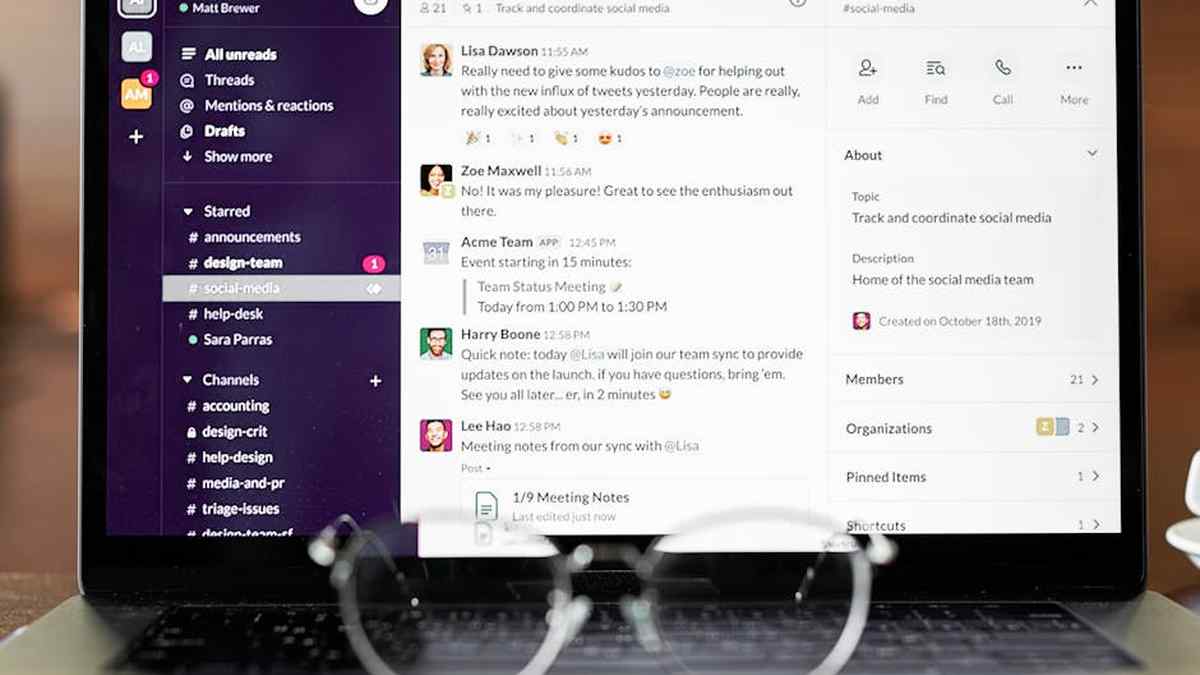
Automating Collaboration: An Expert Analysis of Slack and Microsoft Teams for US Productivity
As an AI automation expert, my objective function is optimizing operational efficiency and maximizing throughput for human-machine systems. In the realm of digital collaboration, Slack and Microsoft Teams are often positioned as primary drivers of synchronous and asynchronous productivity. This analysis dissects their architectural merits and practical impact on US-based teams, evaluating which platform offers superior leverage for automation, integration, and streamlined workflows.
The Core Productivity Conundrum
The choice between Slack and Microsoft Teams is not merely a preference; it is a strategic decision impacting a company’s technological ecosystem, data flow, and the velocity of its distributed workforce. Both platforms aim to reduce context switching, centralize communication, and foster collaboration, but their underlying philosophies and integration paradigms differ significantly. From an automation perspective, the key lies in their API capabilities, third-party integration libraries, and their ability to become a hub for automated tasks and information dissemination.
Product Overviews
Slack: The Agility Enabler
Slack, by Salesforce, has carved out a niche as a highly flexible and developer-friendly communication platform. Its strength lies in its intuitive interface, robust app directory, and powerful API, which facilitate extensive customization and automation possibilities. Slack is often favored by tech-forward companies and teams prioritizing rapid iteration and a rich integration ecosystem.
Microsoft Teams: The Enterprise Integrator
Microsoft Teams, an integral component of Microsoft 365, is positioned as a comprehensive hub for collaboration within the broader Microsoft ecosystem. Its deep integration with Office applications, SharePoint, OneDrive, and Azure AD makes it a natural fit for organizations already heavily invested in Microsoft technologies. Teams aims to consolidate communication, document sharing, and application access into a unified experience, often appealing to larger enterprises seeking an all-in-one solution. Monday.com Work OS Review: Is
Comparative Analysis: Feature Set and Productivity Impact
| Feature Metric | Slack (Product A) | Microsoft Teams (Product B) |
|---|---|---|
| Core Messaging & Channels | Highly intuitive, channel-based communication. Excellent thread management. Flexible channel types (public, private, shared). Optimized for rapid information exchange. | Robust chat and channel system. Deeper integration with documents and tabs within channels, promoting content-rich collaboration. |
| Third-Party Integrations & Automation | Extensive app directory (2,500+). Powerful, flexible API for custom bots & workflows (Workflow Builder). Superior for niche automation and bespoke system connections. | Strong integration with Microsoft ecosystem. Growing app library. Power Automate for custom workflows. Highly effective for M365-centric automation and enterprise process orchestration. |
| Video Conferencing & Calls | Built-in Huddle (audio/video), Slack Calls (1:1 & group). Integrates seamlessly with Zoom, Google Meet, etc. Functional for quick team syncs. | Native, full-featured video conferencing (Meetings). Superior for large-scale calls, webinars, advanced features (breakout rooms, polls, live captions). Designed for comprehensive meeting management. |
| File Sharing & Collaboration | Integrates well with cloud storage (Drive, Dropbox). File previews. Does not offer native document co-authoring for Office files. | Deep integration with OneDrive, SharePoint. Native real-time co-authoring of Office documents within the platform. Superior for document-centric workflows and version control. |
| Security & Compliance | Enterprise-grade security, data encryption, SSO. Strong compliance certifications (SOC 2, ISO 27001). Offers robust data residency options. | Enterprise-grade security built on Microsoft’s infrastructure. Strongest compliance for highly regulated industries (HIPAA, GDPR), comprehensive eDiscovery, and legal hold capabilities. |
| User Experience & Learning Curve | Generally perceived as more user-friendly, clean, and minimalist interface. Lower initial cognitive load and learning curve for basic messaging functions. | Can be perceived as more complex due to feature density and integrated tabs. Steeper learning curve for full ecosystem utilization and navigating multiple functionalities. |
| Cost Efficiency (Perceived Value) | Often seen as a premium for its flexibility, extensive integrations, and focused communication experience. Pricing scales with features and user count. | Often bundled with Microsoft 365 licenses, offering significant perceived value and cost efficiency for existing M365 users by consolidating tools. |
Key Features Differentiators (AI Expert Perspective)
Slack’s Automation Edge:
- Workflow Builder: A powerful no-code automation tool allowing users to create custom workflows for common tasks directly within Slack. This enables non-developers to automate repetitive actions, from onboarding processes to incident reporting, significantly reducing manual effort and improving response times.
- Extensive API & Webhooks: Slack’s open API is renowned for its flexibility, enabling sophisticated custom integrations and bots. These can pull data from disparate systems, trigger actions in external applications, and automate complex business processes, positioning Slack as a critical automation hub.
- Shared Channels: Facilitates seamless cross-organizational collaboration with external partners or clients, automating information flow and reducing email chains between distinct entities without the need for manual relay.
Microsoft Teams’ Integration Power:
- Microsoft 365 Cohesion: The unparalleled deep integration with Word, Excel, PowerPoint, Outlook, SharePoint, and OneDrive means that document collaboration, scheduling, and email management are intrinsically linked. This minimizes context switching for users operating within the Microsoft ecosystem, streamlining daily operations.
- Power Automate (Flow): Microsoft’s robust automation platform is deeply integrated with Teams, allowing for complex, enterprise-level workflow automation across Microsoft services and numerous third-party applications. This enables advanced process orchestration and intelligent task automation.
- Advanced Meeting Functionality: Native features like transcription, live captions, meeting recordings, breakout rooms, and large participant capacities automate aspects of meeting management, accessibility, and post-meeting follow-up, significantly enhancing productivity for distributed and hybrid teams.
Pros and Cons
Slack
- Pros:
- Superior user experience and intuitive interface, leading to lower cognitive load and faster adoption.
- Unrivaled third-party app ecosystem and API flexibility for bespoke automation and specialized tools.
- Excellent for agile development, creative teams, and organizations prioritizing rapid integration and innovation.
- Workflow Builder empowers non-developers to automate routine tasks effectively.
- Cons:
- Can be more expensive for large enterprises, especially when not bundled with other services.
- Native file sharing and co-authoring for Microsoft Office documents are less robust compared to Teams.
- Video conferencing capabilities, while functional, are less feature-rich than Teams’ native offerings.
- Potential for notification overload if not managed effectively, impacting focus.
Microsoft Teams
- Pros:
- Deep, seamless integration with the entire Microsoft 365 suite, ideal for Microsoft-centric organizations.
- Robust native video conferencing and meeting capabilities, including advanced features for large-scale events.
- Strongest enterprise-grade security, compliance, and governance features for regulated industries.
- Often bundled with existing Microsoft 365 subscriptions, providing significant cost efficiency and value.
- Centralized hub for documents, communication, and applications within one unified interface.
- Cons:
- Can feel more complex and less intuitive for new users, leading to a steeper learning curve.
- Interface can appear cluttered due to the abundance of features, tabs, and integrations.
- Third-party app ecosystem, while growing, is not as extensive or flexible as Slack’s for non-Microsoft services.
- Performance can sometimes be resource-intensive, particularly on older hardware.
Who Should Buy / Implement
Slack:
- Agile Startups & Tech Companies: Teams requiring rapid iteration, a high degree of customization, and integration with specialized developer and niche SaaS tools.
- Creative & Marketing Agencies: Organizations where a seamless user experience, a vast array of integrations, and flexible communication channels are paramount for dynamic project workflows.
- Teams Prioritizing Niche Automation: Environments where bespoke bots and workflow automation outside the core Microsoft ecosystem are critical for competitive advantage and unique operational processes.
Microsoft Teams:
- Large Enterprises & Government Organizations: Companies with existing significant investments in Microsoft 365/Azure, prioritizing robust security, comprehensive compliance, and unified communication within a standardized IT environment.
- Organizations with Document-Heavy Workflows: Teams whose primary collaboration revolves around real-time co-authoring, version management, and extensive use of Office documents.
- Educational Institutions: Benefiting from bundled M365 licenses, integrated learning management capabilities, and secure communication for students and faculty.
Who Should Avoid
Slack:
- Organizations Heavily Reliant on Microsoft 365 for All Operations: If your core operations, document management, and calendaring are inextricably linked to Microsoft products, integrating Slack as a primary communication tool may introduce unnecessary friction, redundant costs, and context switching.
- Highly Regulated Industries with Strict Native Compliance Needs: While Slack offers enterprise-grade security, Teams’ native compliance features built deep into the M365 ecosystem might be a more straightforward and less costly solution for some, especially when legal hold, eDiscovery, and granular governance are common requirements.
Microsoft Teams:
- Small Teams or Startups with Minimal Microsoft Investment: If your organization operates primarily on Google Workspace or other non-Microsoft platforms, the benefits of Teams’ deep integration diminish, and its complexity may introduce unnecessary overhead and a steeper learning curve.
- Teams Prioritizing Utmost Simplicity and Minimalist UI: Users who prefer a very clean, focused communication experience without the extensive features, tabs, and integrated applications that Teams offers might find its interface overwhelming and resource-intensive.
Pricing Insight (From an Automation ROI Perspective)
From an automation expert’s view, pricing is not just a nominal cost but an investment in potential ROI derived from efficiency gains and reduced manual labor. Slack offers several tiers: Free, Pro, Business+, and Enterprise Grid. Its value proposition often hinges on the productivity gains realized from its extensive app ecosystem, flexible API, and intuitive Workflow Builder. The cost should be weighed against the unique automation capabilities and reduced context switching it provides.
Microsoft Teams, while offering a Free tier, truly shines when bundled within Microsoft 365 subscriptions (Business Basic, Standard, Premium, and Enterprise plans). For organizations already committed to Microsoft 365, Teams often represents a ‘free’ or significantly reduced marginal cost, offering immense value by consolidating communication, collaboration, and document management tools into a single platform. The true cost analysis involves calculating how much time and manual effort each platform eliminates through its native features, integration capabilities, and reduction of redundant tools, rather than solely focusing on the subscription fee. Building a compelling media kit
Alternatives for Holistic Productivity
- Google Workspace (Google Chat & Meet): A strong contender for organizations rooted in the Google ecosystem, offering deep integration with Gmail, Drive, Calendar, and Docs for collaborative workflows.
- Zoom Workplace: Evolving beyond just video conferencing, Zoom now offers Chat, Phone, Whiteboard, and other features aiming for a unified communication platform, suitable for businesses prioritizing video-first collaboration.
- Discord: While primarily gaming-focused, its robust voice channels, server structure, and rich permissions make it surprisingly effective for some informal professional communities and specific tech or open-source teams.
- Cisco Webex: A comprehensive suite offering messaging, meeting, calling, and contact center solutions, often favored by larger enterprises seeking end-to-end secure communication and a mature enterprise feature set.
Buying Guide: An Automated Decision Matrix
- Evaluate Existing Ecosystem Integration: Assess your current technological stack. Is your organization heavily invested in Microsoft 365, Google Workspace, or other platforms? Deep native integration often yields the highest productivity dividends by reducing friction and leveraging existing infrastructure.
- Define Critical Automation Requirements: Map out your key manual processes and pain points. Which platform’s API, workflow builder, or third-party integrations best address these specific automation needs? Consider both no-code solutions (e.g., Slack Workflow Builder, Power Automate) and the potential for custom development.
- Assess User Experience & Training Overhead: Conduct pilot programs with diverse user groups. While an AI values raw efficiency, human adoption is paramount. Evaluate the learning curve, potential training costs, and user satisfaction. A more intuitive UI often means faster time-to-productivity for a broader user base.
- Analyze Scalability & Governance Features: Consider future organizational growth and regulatory compliance requirements. How easily can the platform scale with your organization’s expanding needs? What are its data retention, eDiscovery, granular permission, and advanced security capabilities?
- Calculate Total Cost of Ownership (TCO): Look beyond the nominal subscription price. Factor in integration costs, potential licensing for complementary tools, ongoing training, and, critically, the quantifiable efficiency gains (or losses) from switching platforms or managing redundancies. The real cost is the net impact on productivity.
Conclusion: The Optimized Choice for US Team Productivity
From an AI automation expert’s perspective, the superior platform for boosting US team productivity is not universally static; it is dynamically determined by the existing organizational architecture, workflow dependencies, and the strategic intent behind digital transformation. For entities deeply embedded within the Microsoft 365 ecosystem, Microsoft Teams typically offers a more seamless, consolidated, and cost-effective path to elevated productivity, primarily through its unparalleled integration and robust meeting functionalities. Its strength lies in leveraging existing infrastructure for unified communication and document collaboration, minimizing ecosystem friction.
Conversely, for organizations prioritizing agility, seeking best-of-breed integrations, and requiring flexible, customizable automation outside a Microsoft-centric environment, Slack emerges as the more potent force multiplier. Its open API, extensive app marketplace, and intuitive workflow builder provide a more adaptable framework for bespoke automation and rapid innovation across diverse tech stacks. Structuring a global remote team
Ultimately, the decision matrix should optimize for minimizing context switching, maximizing integration potential, and enabling repeatable, automated workflows that directly contribute to the organization’s strategic objectives. Both platforms are powerful tools; the critical challenge is aligning their inherent strengths with your team’s specific operational blueprint for maximum efficiency and sustained productivity. Choosing the right project management
Disclaimer: The insights and recommendations provided in this analysis are based on current market knowledge, observed patterns, and generalized operational models as of the date of publication. Technology landscapes, platform features, pricing structures, and integration capabilities are subject to continuous evolution. This review is intended for informational purposes only and does not constitute a guarantee of specific performance, cost savings, or productivity outcomes for any individual or organization. Users are advised to conduct their own thorough due diligence, proof-of-concept testing, and consult with relevant IT and business stakeholders before making purchasing or implementation decisions. No liability is accepted for any reliance placed on the information contained herein. Best practices for securing intellectual
Related Articles
- Monday.com Work OS Review: Is It the Ultimate Platform for Agile Marketing Teams in the USA?
- Building a compelling media kit for securing sponsorships with US brands.
- Structuring a global remote team for US tax efficiency and compliance.
- Choosing the right project management software for asynchronous US remote teams.
- Best practices for securing intellectual property rights for digital products sold in the USA.
Which platform offers a more streamlined workflow for US-based teams to achieve higher daily productivity?
For US teams prioritizing a highly focused, agile communication style, Slack often provides a quicker, more intuitive experience with its channel-centric design and extensive third-party app integrations. However, Microsoft Teams excels for organizations deeply embedded in the Microsoft 365 ecosystem, centralizing documents, meetings, and conversations directly within its interface, which can boost productivity by reducing context switching for users already reliant on Microsoft tools like Outlook, SharePoint, and OneDrive.
How do Slack and Microsoft Teams integrate with common US business tools, and which offers better synergy with our current software investments?
Microsoft Teams offers unparalleled, native integration with the entire Microsoft 365 suite, making it the superior choice for US businesses heavily invested in Microsoft products. Slack, while not as deeply integrated with Microsoft, boasts a vast app directory with thousands of integrations, providing flexibility for companies using a diverse set of best-of-breed tools, including Google Workspace, Salesforce, HubSpot, and various project management platforms. Your decision should align directly with your primary suite of business applications.
For US teams managing complex projects, which platform provides superior features for task management, file sharing, and cross-departmental collaboration?
Microsoft Teams leverages its integration with Planner, To Do, Lists, and SharePoint to offer robust, structured project management and file versioning capabilities directly within channels, ideal for US teams requiring tight control over documents and tasks within a single ecosystem. Slack, while strong in real-time communication, often relies on integrations with dedicated project management tools like Asana, Jira, or Trello for advanced task management. For direct, integrated project collaboration within a Microsoft environment, Teams is generally stronger; for flexibility with external tools and rapid communication, Slack might be preferred.
Considering scalability and ease of adoption for a growing US workforce, which platform offers a better long-term investment for our business?
Microsoft Teams is often bundled with Microsoft 365 subscriptions, making it a highly cost-effective and scalable option for US businesses already using or planning to use Microsoft’s enterprise services, with potentially lower training overhead due to familiarity. Slack, with its intuitive user interface and strong focus on user experience, can often lead to quicker initial adoption, especially for tech-savvy teams. Evaluate your existing IT infrastructure costs, user familiarity with either brand, and long-term licensing strategies to determine which offers the best overall investment and smooth scalability for your expanding US team.



