Introduction: Navigating the Prosumer Audio Interface Landscape
In the burgeoning ecosystem of home recording, the choice of an audio interface is paramount. It serves as the critical bridge between your microphones, instruments, and your digital audio workstation (DAW). For the discerning prosumer – a serious enthusiast or emerging professional – the debate often boils down to balancing pristine audio fidelity with minimal latency, all within a practical budget and setup. This guide dissects the core distinctions between high-performance, XLR-centric audio interfaces and their more compact, USB-C optimized counterparts, empowering you to make an informed strategic decision for your home studio.
| Feature | Professional-Grade Interfaces (XLR-Centric) | Compact USB-C Audio Interfaces |
|---|---|---|
| Primary Connectivity Standard (to PC) | USB-B, USB-C, Thunderbolt (varies by model, often uses USB-C on modern devices) | USB-C (primary selling point for data and power) |
| Typical XLR Inputs | Often 2 to 8+, with dedicated preamps and phantom power | Often 1 or 2, sometimes with more basic preamps |
| Audio Quality / Fidelity | High-end AD/DA converters, premium preamps, often superior dynamic range | Good to very good, suitable for many applications; can vary widely by model |
| Latency Performance | Excellent, often featuring robust drivers and direct monitoring for near-zero latency | Good to excellent; driver optimization is key, typically slightly higher than pro-grade counterparts in complex scenarios |
| Power Source | Often external power supply, some bus-powered via USB-C/Thunderbolt | Primarily bus-powered via USB-C |
| Expandability & I/O | Multiple analog inputs/outputs, MIDI, ADAT/SPDIF for digital expansion, often DSP | Limited analog I/O, rarely digital expansion; focus on core functionality |
| Build Quality & Durability | Robust metal chassis, designed for studio longevity | Often plastic or lighter metal, prioritizing portability |
| Portability | Moderate to low (designed for fixed studio use) | High (designed for mobile and compact setups) |
| Typical Cost Range | $$$ – $$$$$ (e.g., $200 – $1000+) | $ – $$$ (e.g., $50 – $300) |
Product Overview: Defining the Contenders
Professional-Grade Interfaces (XLR-Centric)
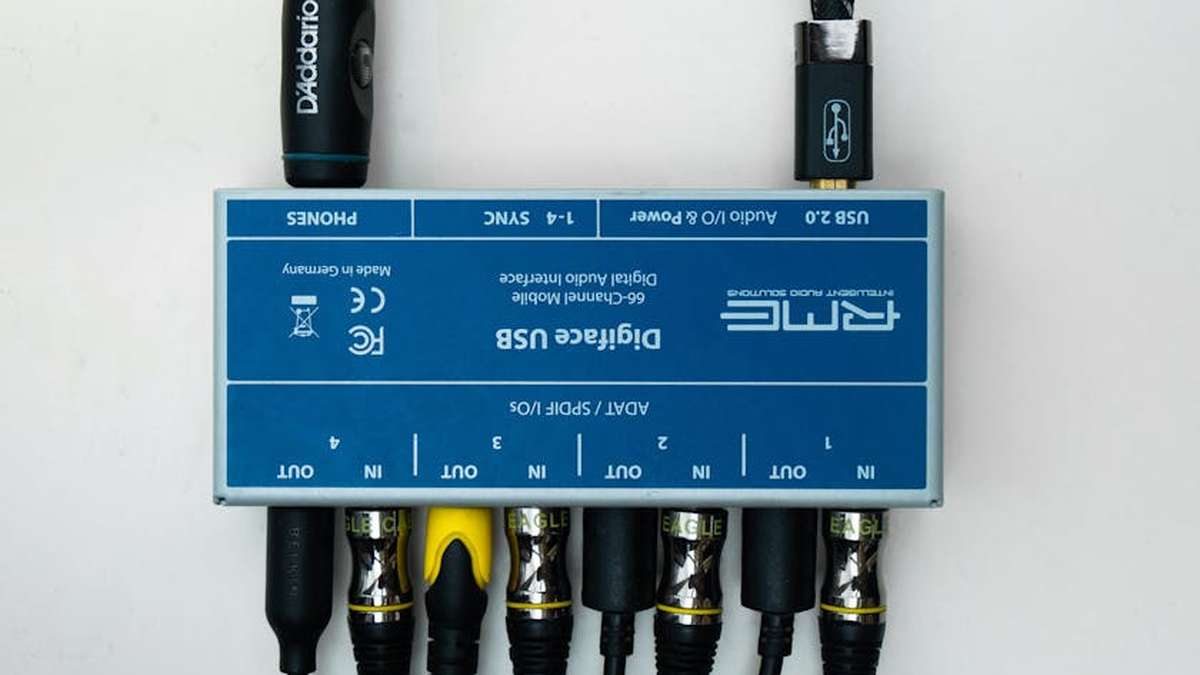
These are the workhorses of serious home and project studios. While modern iterations often leverage USB-C or Thunderbolt for their computer connection, their design philosophy prioritizes high-quality analog circuitry, robust preamps, and comprehensive input/output options, particularly focusing on XLR inputs for microphones. Brands like Universal Audio, Focusrite (Scarlett/Clarett ranges), RME, and Motu are prominent here. They are built for serious audio capture and production, offering features typically found in professional environments.
Compact USB-C Audio Interfaces
This category highlights interfaces where the USB-C connection itself is a primary design consideration, often emphasizing portability, bus power, and streamlined operation. While many also feature XLR inputs, their overall footprint, component choices, and feature sets are often tailored for convenience and mobile workflows. Examples include specific models from PreSonus (AudioBox GO), Behringer (U-Phoria series), or simpler interfaces designed for direct connection to laptops, tablets, or even smartphones via USB-C. ClickUp vs. Monday.com for US
Key Features Differentiated
- Latency Management: Professional-grade interfaces often boast proprietary, highly optimized drivers and hardware DSP (Digital Signal Processing) that significantly reduce latency, making real-time monitoring and tracking a seamless experience. Compact USB-C interfaces, while often good, can exhibit slightly higher latency, especially as project complexity increases, due to simpler drivers or less dedicated hardware.
- Audio Fidelity: The cornerstone of pro-grade interfaces is superior AD/DA (Analog-to-Digital / Digital-to-Analog) conversion and high-quality preamps. This translates to a cleaner, more detailed sound capture with a wider dynamic range. While compact USB-C options offer perfectly acceptable quality for many applications, they may not match the nuance and depth of higher-end components.
- Connectivity & Expandability: Professional interfaces provide a rich array of inputs (XLR, ¼” TRS, Hi-Z) and outputs, alongside MIDI I/O and often digital expansion ports like ADAT or SPDIF. Compact USB-C interfaces typically offer a minimalist I/O, focusing on 1-2 XLR inputs and basic line outputs.
- Power & Portability: Many professional interfaces require an external power supply due to their power-hungry components. Compact USB-C interfaces are almost universally bus-powered, drawing all necessary power directly from the host device, making them ideal for on-the-go recording.
Pros and Cons
Professional-Grade Interfaces (XLR-Centric)
- Pros:
- Exceptional audio fidelity and pristine sound capture.
- Ultra-low latency for demanding recording and monitoring tasks.
- Robust, stable drivers and dedicated software features.
- Extensive I/O for multiple microphones, instruments, and studio monitors.
- Durable build quality for long-term studio integration.
- Cons:
- Higher cost of entry.
- Larger physical footprint, less portable.
- Often requires external power, adding cable clutter.
- Can be overkill for very basic recording needs.
Compact USB-C Audio Interfaces
- Pros:
- Highly portable and lightweight.
- Convenient bus-powered operation (no external power supply needed).
- Typically more affordable, offering excellent value for basic setups.
- Modern USB-C connectivity ensures broad compatibility with current devices.
- Simpler setup and operation for beginners or quick sessions.
- Cons:
- Potentially higher latency, especially with multiple tracks or demanding plugins.
- Good but generally not “pristine” audio fidelity compared to premium options.
- Limited input/output options restrict expandability.
- Driver quality and long-term support can vary more widely.
- Less robust build quality in some budget models.
Who Should Buy
- Professional-Grade Interfaces (XLR-Centric):
- Serious Home Studio Owners: Individuals creating music, podcasts, or voiceovers who prioritize sound quality and need multiple inputs for instruments or vocalists.
- Musicians & Producers: Those requiring ultra-low latency for monitoring live performances, tracking multiple instruments simultaneously, or using CPU-intensive virtual instruments.
- Content Creators with Growing Demands: Podcasters or streamers planning to incorporate multiple hosts, guests, or instruments into their production.
- Compact USB-C Audio Interfaces:
- Beginner Home Recordists: Individuals just starting out with home recording who need a simple, affordable solution to connect one or two microphones/instruments.
- Mobile Content Creators: Podcasters, vloggers, or musicians who frequently record on location, requiring a portable and bus-powered interface.
- Quick Setup & Simplicity Seekers: Anyone who values ease of use and a minimal setup for impromptu recording sessions or specific single-track needs.
Who Should Avoid
- Professional-Grade Interfaces (XLR-Centric):
- Casual Users with Minimal Needs: If you only need to record a single vocal track once in a while and portability is key, the complexity and cost might be overkill.
- Budget-Constrained Beginners: The initial investment can be significant, potentially diverting funds from other essential gear.
- Compact USB-C Audio Interfaces:
- Demanding Audio Professionals/Prosumers: Those who require absolute pristine audio quality, extensive I/O, or rock-solid, near-zero latency for complex, high-track-count projects.
- Studios Aiming for Future-Proofing: Limited expandability means these interfaces might be quickly outgrown as your studio evolves.
Pricing Insight
The price spectrum is wide for both categories. Professional-grade interfaces typically range from $200 USD for entry-level two-input models (e.g., Focusrite Scarlett 2i2) up to $1000+ USD for interfaces with advanced DSP, more I/O, and premium converters (e.g., RME Babyface Pro FS, Universal Audio Volt series). Compact USB-C interfaces, focusing on simplicity and portability, can be found from as low as $50 USD for very basic models to around $300 USD for more feature-rich portable options.
Alternatives to Consider
- Thunderbolt Interfaces: For the absolute lowest latency and highest bandwidth, Thunderbolt interfaces (like those from Universal Audio Apollo series or some Motu models) offer unparalleled performance, albeit at a higher cost and requiring a Thunderbolt-compatible computer.
- Dedicated Mixers with USB Audio: If you primarily work with multiple live inputs and need hands-on control, a compact digital mixer with a built-in USB audio interface can serve as a powerful all-in-one solution.
- Standalone Field Recorders: For ultimate portability and recording away from a computer, high-quality field recorders can capture audio directly to an SD card.
- High-End Preamps: In some professional setups, external dedicated preamps are used in conjunction with a simpler audio interface to achieve specific tonal characteristics and even higher fidelity.
Buying Guide: Your Strategic Checklist
- Assess Your Core Needs:
- Input Count: How many microphones or instruments do you need to record simultaneously?
- Microphone Types: Do you use condenser mics requiring phantom power (+48V)?
- Instruments: Do you need dedicated Hi-Z inputs for guitars/basses?
- Latency Requirements:
- Are you recording live instruments with virtual amps or monitoring vocals with effects in real-time? If so, lower latency is critical.
- If you primarily edit pre-recorded audio, latency is less of a concern.
- Budget Allocation:
- Determine a realistic budget range, but be prepared to invest in quality – your interface is the foundation of your sound.
- Portability vs. Studio Integration:
- Will your interface remain stationary in your home studio, or do you need to take it on the go frequently?
- Driver Stability & Support:
- Research user reviews and manufacturer reputation for driver quality and long-term operating system compatibility. A stable driver is crucial for a frustration-free experience.
- Compatibility:
- Ensure compatibility with your computer’s operating system (Windows, macOS, Linux) and your chosen DAW.
Conclusion: The Right Tool for Your Sonic Ambition
The choice between a professional-grade, XLR-centric interface and a compact USB-C optimized solution hinges entirely on your specific prosumer needs, budget, and workflow. If your ambition leans towards uncompromising audio fidelity, minimal latency for complex productions, and ample expandability, investing in a robust, professional-grade interface with quality XLR inputs is the strategic play. However, for the mobile creator, the beginner, or anyone prioritizing streamlined simplicity and portability for excellent results on a budget, a well-chosen compact USB-C interface offers immense value.
Ultimately, both categories can produce fantastic results. The key is to understand their fundamental differences and align them with your unique recording objectives. Choose wisely, and let your creativity flourish. Cybersecurity Best Practices for US
No Guarantees
The information provided in this review is for general guidance only and is based on typical product characteristics and market trends at the time of writing. Product specifications, pricing, and availability are subject to change by manufacturers and retailers. While every effort has been made to ensure accuracy, individual experiences may vary. Always conduct your own research and consult specific product documentation before making a purchase decision.
Related Articles
- ClickUp vs. Monday.com for US Marketing Agencies: A Deep Dive into Campaign Management Workflows.
- Cybersecurity Best Practices for US Remote Teams Managing Sensitive Client Data Across Global Networks
- The Creator’s Guide to Monetizing Niche Online Communities Through Sponsored Content and Digital Products in the USA
- Building a Recurring Revenue Model for B2B Service Providers Using Membership Platforms and US-Based CRM
- Advanced Tax Deductions for US Digital Nomads Earning Through Multiple International Platforms
Question 1: For professional-grade recordings in a home studio, should I prioritize a dedicated interface with XLR inputs (connecting via USB-C) or a simpler “USB-C only” audio device?
For a prosumer aiming for professional-grade audio quality and flexibility, you should prioritize a dedicated audio interface that features traditional XLR inputs for microphones and instruments, even if it connects to your computer via a USB-C port. These interfaces typically boast higher quality preamps, robust low-latency drivers (like ASIO for Windows or Core Audio for Mac), and dedicated Analog-to-Digital Converters (ADCs) essential for fidelity. Simpler “USB-C only” audio devices, such as direct USB-C microphones or very basic interfaces marketed solely on their USB-C connection, often make compromises on component quality, driver performance, and input options that are crucial for a serious home recording setup. The USB-C connector itself is excellent for data transfer, but the internal hardware of the interface dictates the true audio performance.
Question 2: How does the choice between an XLR-input interface and a simpler USB-C audio device impact monitoring latency during recording sessions?
Monitoring latency is significantly influenced by the interface’s internal design and its software drivers, more so than the USB-C connector itself. Dedicated XLR-input audio interfaces are designed with robust, low-latency drivers (e.g., ASIO for PC, Core Audio for Mac) and optimized internal architecture to minimize the delay between input and output. This allows for near real-time monitoring of vocals or instruments while recording, which is critical for performance. Simpler USB-C audio devices or direct USB-C microphones often rely on generic system drivers or less sophisticated internal processing, which can introduce noticeable latency, making accurate real-time monitoring challenging and potentially disrupting your recording flow.
Question 3: Will opting for a simpler “USB-C audio device” limit my microphone choices or compromise the overall sound fidelity for my home studio?
Yes, choosing a simpler “USB-C audio device” can significantly limit your microphone choices and potentially compromise overall sound fidelity. Dedicated XLR-input interfaces provide universal compatibility with the vast majority of professional microphones, including condenser mics requiring phantom power (+48V), which simpler USB-C solutions often lack. Furthermore, XLR-input interfaces typically feature superior quality preamps and ADCs, which are fundamental to capturing clean, detailed, and dynamic audio. Simpler USB-C devices often use less robust components, leading to a noticeable reduction in sound quality, higher noise floors, and a less accurate capture of your source audio, which is a major concern for prosumer-level fidelity.
Question 4: Considering future expansion and adaptability, which type of interface offers better long-term value for a growing home recording studio?
For long-term value, future expansion, and adaptability, a dedicated audio interface with XLR inputs (even if it connects via USB-C) is unequivocally the better choice for a growing home recording studio. These interfaces are built as the central hub of a studio, offering multiple inputs for microphones and instruments, sometimes MIDI I/O, and often digital expansion ports like ADAT to add more channels as your needs grow. They integrate seamlessly with professional studio monitors, headphones, and outboard gear. Simpler “USB-C audio devices” are typically closed systems with minimal or no expansion capabilities, limiting your ability to add more microphones, instruments, or integrate additional professional equipment as your studio evolves. Investing in a quality XLR-input interface provides a solid foundation for future growth.